Covalent
A lightweight Java component model and runtime container.
Home | Previous: Covalent HMI Guide | Next: Solar System Simulation - Architecture
Table of Contents
- Covalent Examples
- Capability Matrix
- Neural Network Trainer
- Solar System Simulation
- Ecosystem
- Rubik’s Cube Solver
Covalent Examples
A note on the examples. The examples are there to show how Covalent is used. They, and the algorithms they run (the training, the solver, the simulations), were written with the help of an AI assistant, and are not meant as reference implementations of those algorithms. The component structure, the ports and the use of the container are what they illustrate.
covalent-examples hosts a handful of small, runnable JavaFX applications
built entirely on Covalent. Each one leans into a different subset of the
framework’s mechanisms rather than showcasing every feature at once, and
each is launched from a single entry point, LauncherApplication:
mvn -f covalent-examples/pom.xml -am -DskipTests javafx:run
With the Maven Wrapper (see Building And Testing The
Repository for it and for
the required JDK version), use .\mvnw.cmd on Windows and ./mvnw elsewhere
in place of mvn. Add -Pjmx to let a JMX tool connect to the JVM that runs
the examples (localhost:9010, or the next free port; see
Connecting a JMX Tool to the
Application).
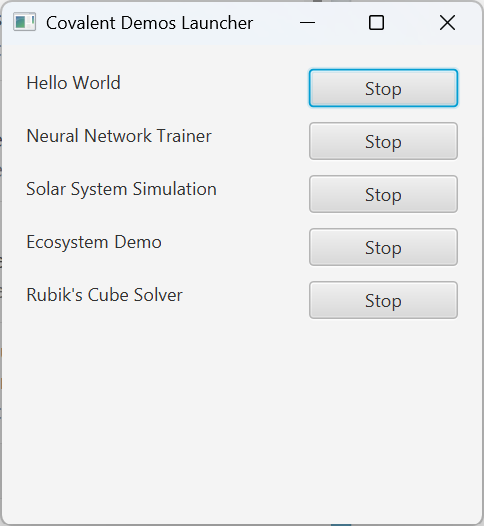
This opens a small launcher window with one button per demo. Each demo runs
in its own, independently started and stopped CovalentContainer, obtained
through Covalent.managedContainer(name), so several can run side by side
without interfering with one another, and stopping one leaves the others
untouched. The supervisor is
available alongside every demo: press Ctrl+Shift+F12
in any demo window to open it and inspect the live component graph while the demo
runs (see Summoning the Supervisor).
Every demo window also carries its own “Help” menu, with “About” and
“Using” entries that each open a small, non-modal, read-only panel -
one summarizing what that demo illustrates and which Covalent mechanisms
it uses, the other describing how to drive its controls. Built by each
demo’s own HmiBuilder alongside everything else it assembles, this is
the one piece of HMI code in every demo that is not itself an MVIC.
The MVIC Pattern
Every demo function is built the same way: Model / Controller / Interaction Controller / View (MVIC), one instance per function, as a single composite grouping the four.
- The Model holds the function’s state and produces its events - no logic beyond deciding when something changed.
- The Controller holds the actual logic: it reacts to services calls and to events, and drives the Model.
- The Interaction Controller is the only component that registers the
function’s user-triggered actions with the HMI’s
ActionManager
(
ActionProviderServices.registerActionExecution). - The View renders the Model’s state and triggers actions by
ActionKey (
ActionConsumerServices.executeAction)- it never calls the Interaction Controller directly.
This keeps all four genuinely independent: the Model doesn’t know a View exists, and the View doesn’t know which component ends up handling an action it triggers.
Capability Matrix
Four demos make up this module, each leaning into a different subset of Covalent’s mechanisms. The matrix shows which of them each one actually demonstrates - not which ones it merely could.
| Capability | Neural Network Trainer | Solar System Simulation | Ecosystem | Rubik’s Cube Solver |
|---|---|---|---|---|
| Services | ✅ | ✅ | ✅ | ✅ |
| Extending Services | - | - | - | ✅ |
| Parameters | ✅ | ✅ | ✅ | ✅ |
| Events | ✅ | ✅ | ✅ | ✅ |
Generic Subscribe (GenericSubscribe) |
✅ | - | - | - |
| Object Observers | - | - | ✅ | - |
| Event Filters | - | ✅ | ✅ | - |
| Event Subscription Delegation | ✅ | - | ✅ | ✅ |
| Custom Event Subscription (extra subscribe arguments) | - | - | ✅ | - |
Event Cloning (@Cloned) |
- | - | - | ✅ |
| Composition | ✅ | ✅ | ✅ | ✅ |
| Recursive Decomposition (composites nested in composites) | - | - | ✅ | - |
| Root Composite | ✅ | ✅ | ✅ | - |
Items (@Item) |
✅ | - | ✅ | - |
| Raw Components | - | - | ✅ | - |
| HMI / ActionManager | ✅ | ✅ | ✅ | ✅ |
Asynchronous Services (AsyncServices) |
- | - | - | ✅ |
A root composite deploys the whole application as a single top-level component containing every function as a sub-component, rather than several independent root components side by side - the alternative Rubik’s Cube Solver demonstrates explicitly instead (see its architecture page’s Top-Level Composites section).
Neural Network Trainer
What NNTrainer Does
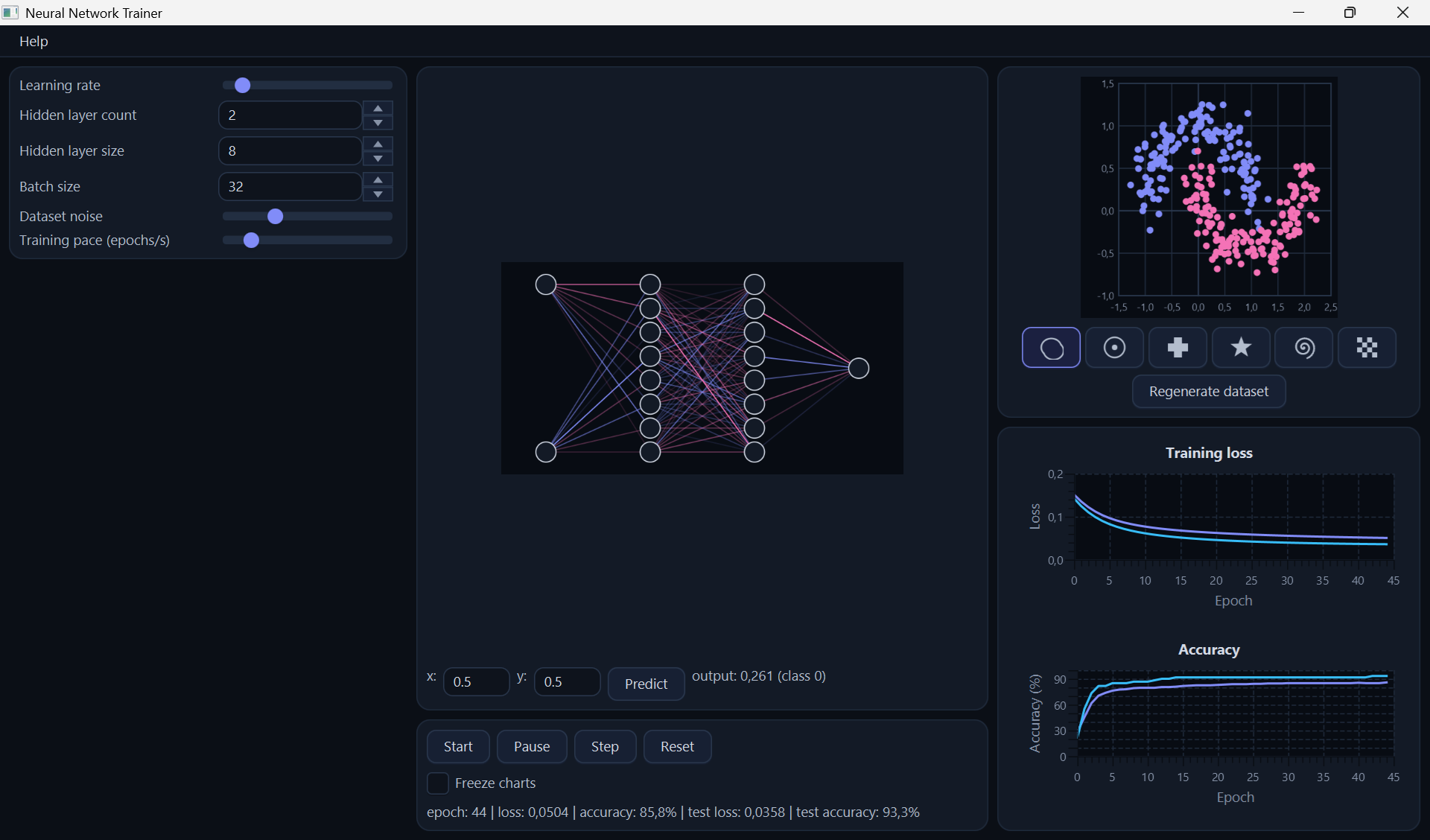
NNTrainer trains a small feed-forward neural network, in real time, on a toy two-dimensional classification problem whose shape is chosen among two moons, ring, cross, star, spiral and checkerboard: the dataset, the network’s layer/weight structure, and the training loss all update live as the controls are used.
Using NNTrainer
The window has three columns.
- User configuration (left column): learning rate, hidden layer count, hidden layer size, batch size, dataset noise and training pace (epochs/s). The changes take effect immediately, live, without stopping and restarting training, except dataset noise: the slider is kept with the training settings but is not applied, and “Regenerate dataset” always draws the dataset with a fixed noise of 0.15.
- Network (center column, top): click on the network diagram to highlight a layer; its neurons are drawn in gold. Enter x/y values in the “try it yourself” row and click “Predict” to see the network’s current output for that point.
- Training (run controls in the center column, charts in the right column): “Start” begins training, “Pause” suspends it, “Step” runs exactly one epoch, “Reset” reinitializes the network’s weights from scratch. The status line reports the current epoch, loss and accuracy; two stacked charts plot loss and accuracy over time, each showing both the training and the held-out test subset. “Freeze charts” stops the charts from updating, without pausing training itself - training keeps running underneath, and the charts resume (with a visible gap) once unfrozen.
- Dataset (right column, top): the shape buttons select two moons, ring, cross, star, spiral or checkerboard; “Regenerate dataset” draws a fresh point cloud of the selected shape with a new random seed. A click on the plot copies the x/y coordinates of the clicked point into the “try it yourself” row of the network panel.
Covalent Capabilities In NNTrainer
Every user-triggered control - “Start”, “Predict”, the sliders in User
Configuration - is registered by its Interaction Controller against an
ActionKey through ActionProviderServices, and executed by its View
through ActionConsumerServices, rather than a View holding a direct
reference to the Interaction Controller behind it (see
ActionManager). Concretely, a View never knows
which component implements “Start training”; it only knows the action’s
key. This is what keeps the View,
Controller, Interaction Controller and Model genuinely independent: any of
them can be reworked, or a control re-labeled and moved to a different
panel, without touching the others’ code.
The demo also uses @Item for its
gradient-descent optimizer: an internal sub-part of the network’s
Controller with no component identity, lifecycle or wiring of its own -
the right tool when a piece of state needs to be owned and encapsulated,
but never looked up or activated independently.
“Freeze charts” is this demo’s illustration of manual subscription without
a specific subscribe interface:
TrainingView consumes TrainingEvents, which declares no
@EventsSubscribe interface of its own, so it is free to subscribe to
(and unsubscribe from) it manually through GenericSubscribe instead of
Covalent’s ordinary automatic autowiring - exactly the partial-lifecycle
case that mechanism exists for. TrainingInteraction consumes the
same TrainingEvents independently, still automatically, so freezing the
charts never affects its own reaction to convergence and reset.
Each function (Dataset, Network, Training) is a
composite @Implementation grouping
its own Model/Controller/View/Interaction Controller as child components; a
late-joining subscriber catches up on already-in-progress state through
event subscription delegation
rather than missing whatever happened before it subscribed.
The whole demo also deploys as a single root
composite, NeuralNetworkDemoImpl: the
launcher starts and stops it with one deployComponents(...)/start()
call pair, and the container resolves every function’s activation order
from its field declarations - rather than the launcher constructing and
wiring five functions by hand.
For the full component-level architecture - root dependencies, the shared interfaces between functions, a per-function MVIC decomposition with full interface method signatures, and how the HMI is assembled from every function’s View - see Neural Network Trainer - Architecture.
Solar System Simulation
What Solar System Simulation Does
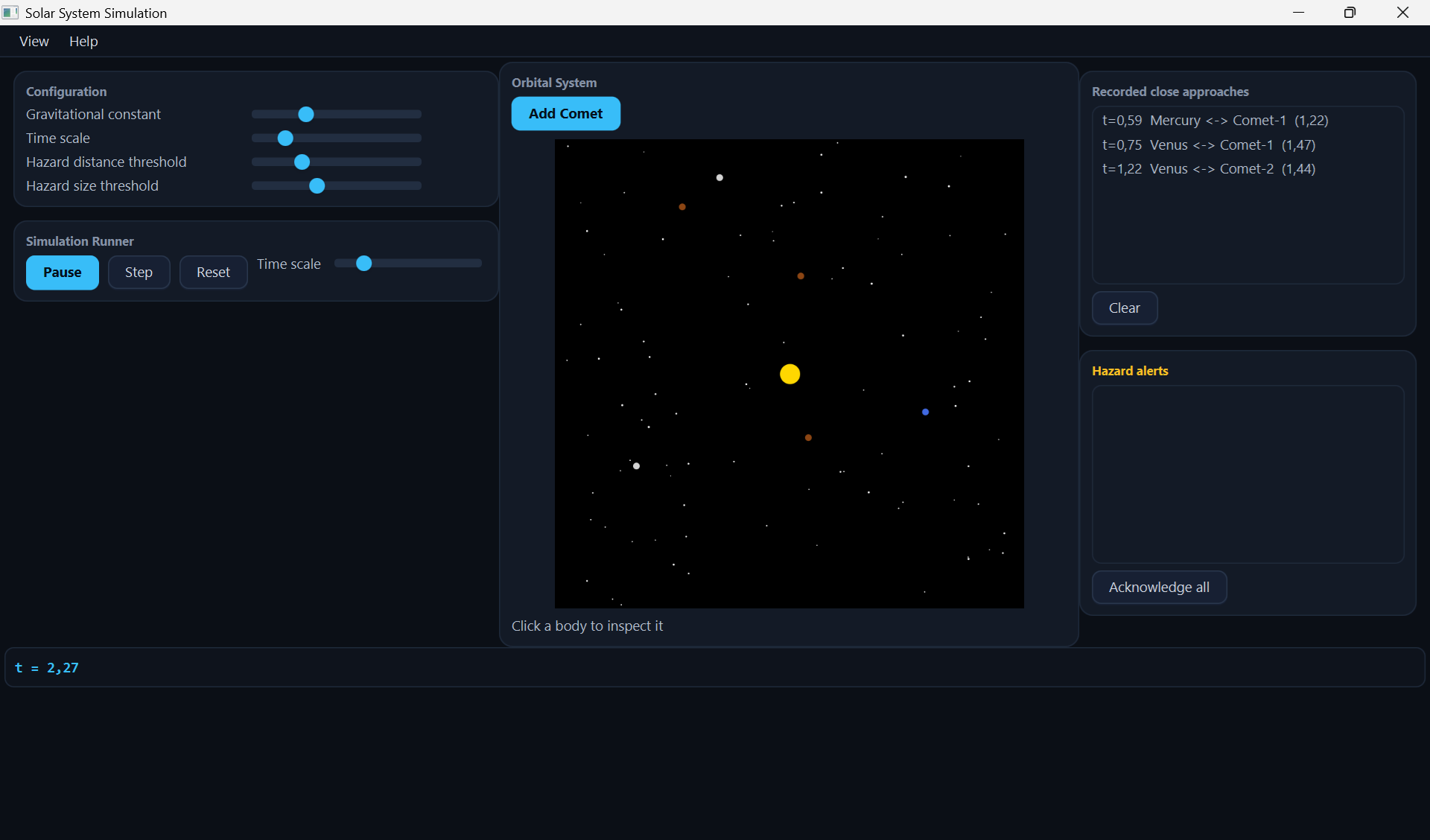
Solar System Simulation is a small 2D n-body gravitational demo: a Sun and a few planets attract each other and are integrated forward in time, animated live on an orrery view, with a hazard layer watching for close approaches between bodies.
Using Solar System Simulation
The window has a left column (configuration, then run controls), the orrery in the center, the two event logs on the right, and the readout at the bottom.
- Left column, top (User configuration): four live sliders - gravitational constant, time scale, hazard distance threshold and hazard size threshold. Moving one applies immediately. Close approaches are only detected when two bodies come within 1.5 units of each other, so a hazard distance threshold above 1.5 adds nothing.
- Left column, bottom (run controls): Start/Pause toggles continuous stepping, Step advances exactly one tick, Reset restarts the system from its initial layout. A second time scale slider sits next to them; the two time scale sliders are not kept in step with each other: the last one moved sets the value, and the other one does not follow.
- Center (the orrery): the live 2D view of the system, with an “Add Comet” button above it that drops in one more comet on a randomized, strongly eccentric orbit crossing every planet’s path - a quick way to manufacture close approaches for Orbital Watch and Hazard Alert to react to. Click a body to select it and see its details - mass, radius, distance from the Sun and speed, as they were when you clicked.
- Bottom (readout): elapsed simulation time, shown briefly in bold when Step is pressed.
- Right side, top (Orbital Watch): every close approach ever detected between two bodies, regardless of the hazard thresholds. “Clear” empties the log.
- Right side, bottom (Hazard Alert): only the approaches that currently cross both the distance and size thresholds set above, plus any approach where two bodies touch or visibly overlap, whatever the size threshold. “Acknowledge all” clears the list; tightening or loosening the thresholds changes what qualifies from the next approach on.
- View menu: two mutually exclusive entries, Dark Theme (the default) and Light Theme, swapping the whole window’s stylesheet. Purely cosmetic - the simulation itself behaves identically either way.
Covalent Capabilities In Solar System Simulation
OrbitalWatch and HazardAlert both subscribe to the very same
CloseApproachEvents interface, but in two contrasting ways (see Event
Filters): OrbitalWatch subscribes
to every notification through ordinary, automatic autowiring, while
HazardAlert subscribes manually with a filter that re-reads its own live
thresholds on every notification - moving a slider changes what qualifies
from the next close approach on, with no re-subscription needed. This is
the demo’s clearest illustration of a filter’s actual purpose: two
independent consumers, each seeing a different subset of the same
broadcast stream, without either one sorting events itself in its own
callback.
As in the neural network demo, every control is routed through
ActionProviderServices/ActionConsumerServices rather than a View
calling an Interaction Controller directly (see
ActionManager), and each function -
OrbitalSystem, SimulationRunner, OrbitalWatch, HazardAlert - is its
own composite @Implementation.
The whole demo also deploys as a single root
composite, SolarSystemDemoImpl: the launcher
starts and stops it with one deployComponents(...)/start() call pair,
and the container resolves every function’s activation order from its
field declarations - rather than the launcher constructing and wiring six
functions by hand.
For the full component-level architecture - root dependencies, the shared interfaces between functions, a per-function MVIC decomposition with full interface method signatures, and how the HMI is assembled from every function’s View - see Solar System Simulation - Architecture.
Ecosystem
What Ecosystem Does
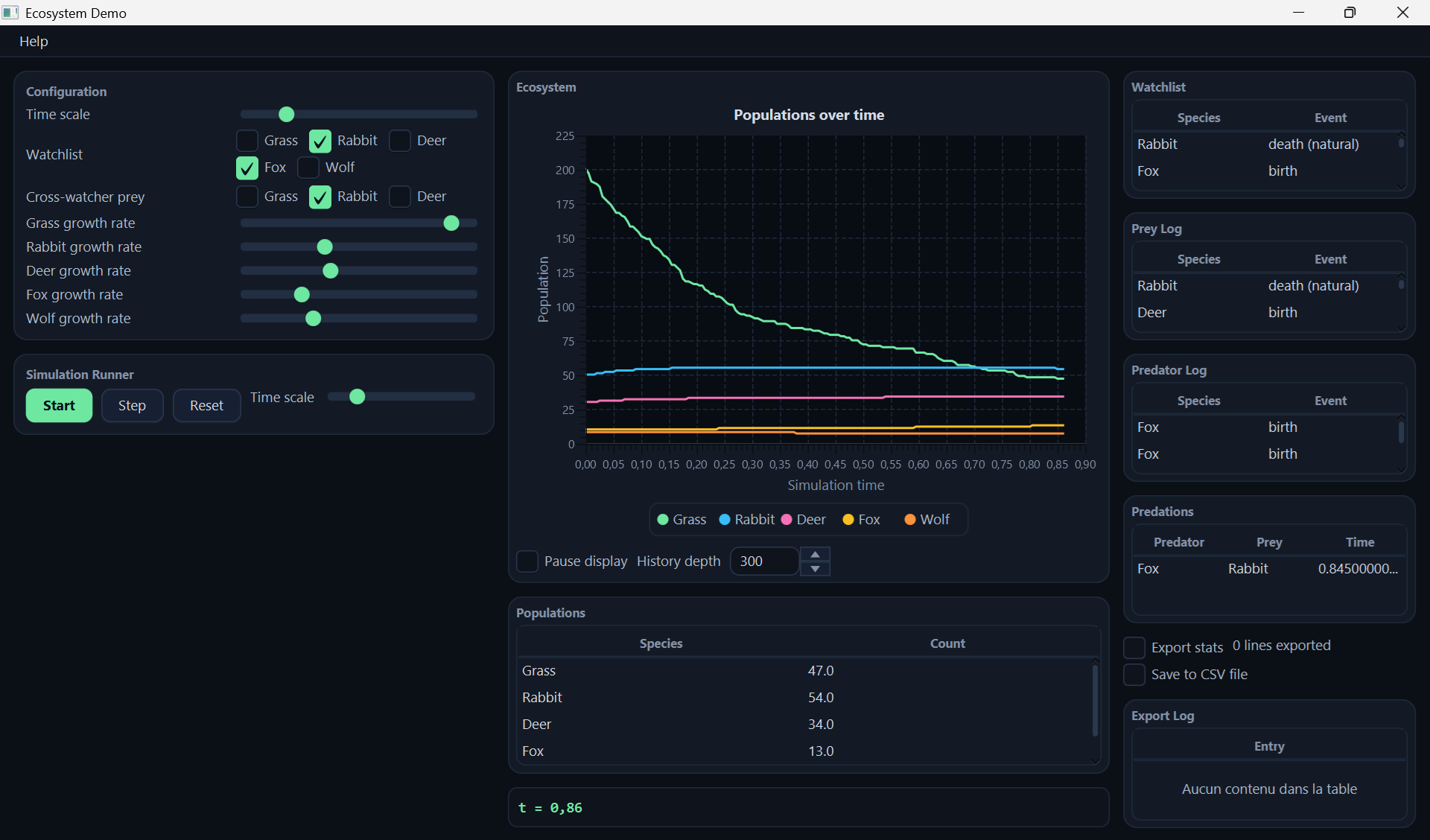
Ecosystem is a small population-dynamics simulation: Grass, Prey and Predator populations interact through a stochastic, tau-leaping generalized Lotka-Volterra model, with live population curves showing the resulting growth, decline and oscillation. Three watchers observe the same stream of birth/death/predation notifications, each scoped to its own concern, and a raw component mirrors the running population counts out to a CSV file.
Using Ecosystem
The window has three columns.
- Left column (User configuration and run controls): a growth rate per species, the simulation’s time scale, and the watched species for the Watchlist and Cross-watcher watchers, ticked from one check box per species; every change takes effect immediately. Below it, Start/Pause/Step/ Reset, exactly as in Solar System Simulation.
- Center column: a live chart of every species’ population over time, then a table of the current population counts and the elapsed time. A “Pause display” checkbox freezes the chart and the counts while the simulation keeps running; its “History depth” field sets how many of the missed points come back on resume.
- Right column: four watcher tables - a Watchlist table, a Prey log and a Predator log (paired), and a Cross-watcher table - followed by the Stats Export panel and its log.
- Right column, bottom (Stats Export): an “Export stats” checkbox that starts or stops computing one population snapshot per second and logging it below, and a separate “Save to CSV file” checkbox that turns persisting those same snapshots to disk on or off - the file itself is only ever created the first time saving is turned on. A running count of lines processed sits next to the checkboxes, and an Export Log table mirrors the exact header and data lines as they are produced, whether or not saving is currently on.
Covalent Capabilities In Ecosystem
One interface carries almost all of the cross-function work:
PopulationEvents, produced once by Ecosystem and consumed
independently by the three watchers inside Watchers, each with its own
filter - the same broadcast stream
partitioned three different ways. RoleWatcher combines its filter with
subscribing an object instead of the consumer
component:
two small delegate instances, one per role, so its own callback never
branches on which role a notification belongs to.
The chart’s own events, EcosystemStateEvents, show subscription with
custom arguments: the
View subscribes manually, and each subscription carries the simulation time
of the last state it has and a history depth, which the Model uses to
replay the missed states (event subscription
delegation) when the
display resumes from a pause.
A raw component pair, StatsExporter and StatsExportWidget, mirrors the
running population counts to a CSV file from outside the managed
component graph entirely, wired by the demo’s own launcher rather than
deployComponents(...) - see Raw Components and the
architecture page’s own section on it.
As in the other demos, every control is routed through
ActionProviderServices/ActionConsumerServices (see
ActionManager), each function is its own
composite @Implementation, and the
whole demo deploys as a single root
composite, EcosystemDemoImpl. It is also the
one demo that decomposes recursively: the Watchers function is a composite
of three watcher composites, each grouping its own four MVIC components, so
the tree is three levels deep (see the architecture page’s Top-Level
Composites).
For the full component-level architecture - root dependencies, the shared interfaces between functions, a per-function MVIC decomposition with full interface method signatures, the raw component pair, and how the HMI is assembled from every function’s View - see Ecosystem - Architecture.
Rubik’s Cube Solver
What Rubik’s Cube Solver Does
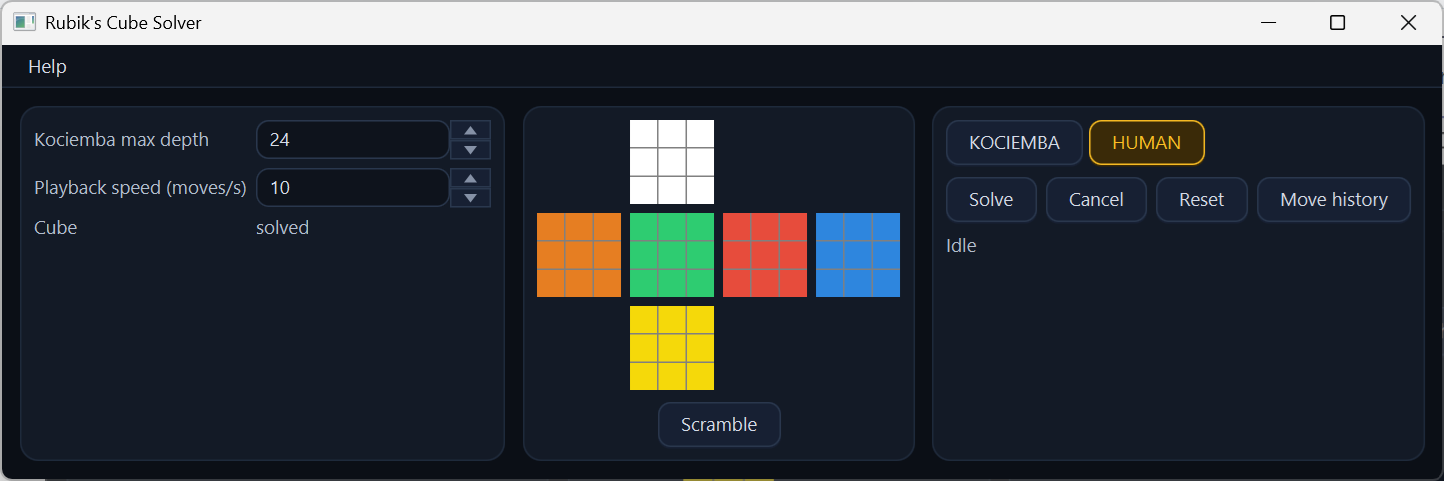
Rubik’s Cube Solver is a cube model that two independent solving algorithms, Kociemba’s two-phase strategy and the layer-by-layer method a person follows, can each be set loose on: pick an algorithm, start a solve, and watch it run off the UI thread while its progress is reported live.
Using Rubik’s Cube Solver
- Center (the cube view): a classic unfolded cube net. Click any facelet to rotate that face clockwise; “Scramble” randomizes the cube.
- Right side (the solver panel): pick Kociemba or Human, “Solve” starts a solve and “Cancel” stops it, “Reset” abandons the current attempt and returns the cube to solved, a progress label reports the search’s current state, and a move history panel can be toggled on to trace every cube state change while it is open.
- Left panel (User configuration): the Kociemba phase-2 maximum depth and the playback speed (moves per second at which a found solution is played onto the cube), plus a read-only “solved” indicator that shows the cube’s status when the panel activated and does not follow later moves.
Covalent Capabilities In Rubik’s Cube Solver
Unlike the other three demos, nothing here wraps the whole application in
a single root composite: Cube, Solver, UserConfiguration and
HmiBuilder are passed directly to deployComponents(...), several
independent top-level composites side by side rather than one.
CubeServices extends CubeReadServices
(extending services): the
cube’s mutating operations (applyMove, scramble and resetToSolved)
are reachable only through the wider interface, while UserConfiguration is written against the read-only one
alone. SolverController drives each solve through
AsyncServices, the
container’s own Application Utility Service, off the UI thread, on a
dedicated queue key that also makes cancellation meaningful.
CubeEvents.stateChanged carries its CubeState argument
@Cloned, since CubeState is
mutable and the instance delivered is the one the Model holds, so each
subscriber receives its own copy, and CubeModelImpl’s subscription
delegation pushes a real catch-up snapshot to a late subscriber.
For the full component-level architecture - the no-root-composite deployment shape, the shared interfaces between functions, a per-function MVIC decomposition with full interface method signatures, and how the HMI is assembled from every function’s View - see Rubik’s Cube Solver - Architecture.
Home | Previous: Covalent HMI Guide | Next: Solar System Simulation - Architecture