Covalent
A lightweight Java component model and runtime container.
Home | Previous: Covalent Examples Guide | Next: Neural Network Trainer - Architecture
Table of Contents
This page is the architecture reference for the Solar System Simulation demo: every root component, how they depend on one another, the interfaces shared between them, the internal MVIC decomposition of each function, and how the HMI is assembled from all of it. It complements the demo’s entry in the Examples Guide, which covers what the demo does and how to use it - this page is about how it is built.
Top-Level Composites Dependency Diagram
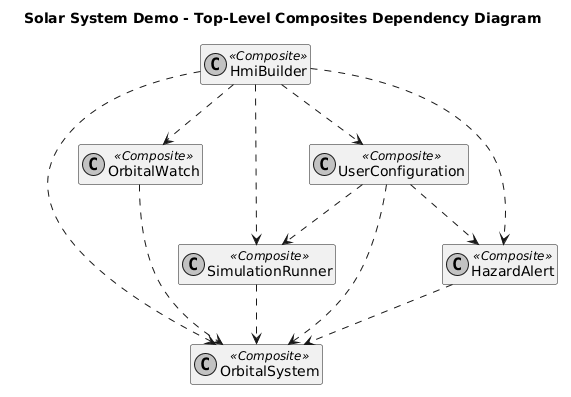
Six composites:
OrbitalSystem, SimulationRunner, OrbitalWatch, HazardAlert,
UserConfiguration and HmiBuilder. OrbitalSystem is the only one every
other function depends on - it owns the bodies and the gravity computation
that everything else either drives, watches or displays.
UserConfiguration depends on three functions at once (OrbitalSystem,
SimulationRunner, HazardAlert), and HmiBuilder on all five others: it
is the composition root, built last, that assembles the whole window. The
technical HmiCore component is left out of this diagram on purpose - it
carries no domain meaning.
These six are each a function’s own composite, at the top of its own MVIC -
not the application’s root. All six, plus HmiCore, are declared as
@Implementation fields inside SolarSystemDemoImpl, the demo’s actual
root composite and the only class
the launcher passes to deployComponents(...). Activation and passivation
both proceed children-before-parent, in field-declaration order: the
launcher never sequences a function by hand, it deploys one class and
calls start()/stop().
Functions Overview
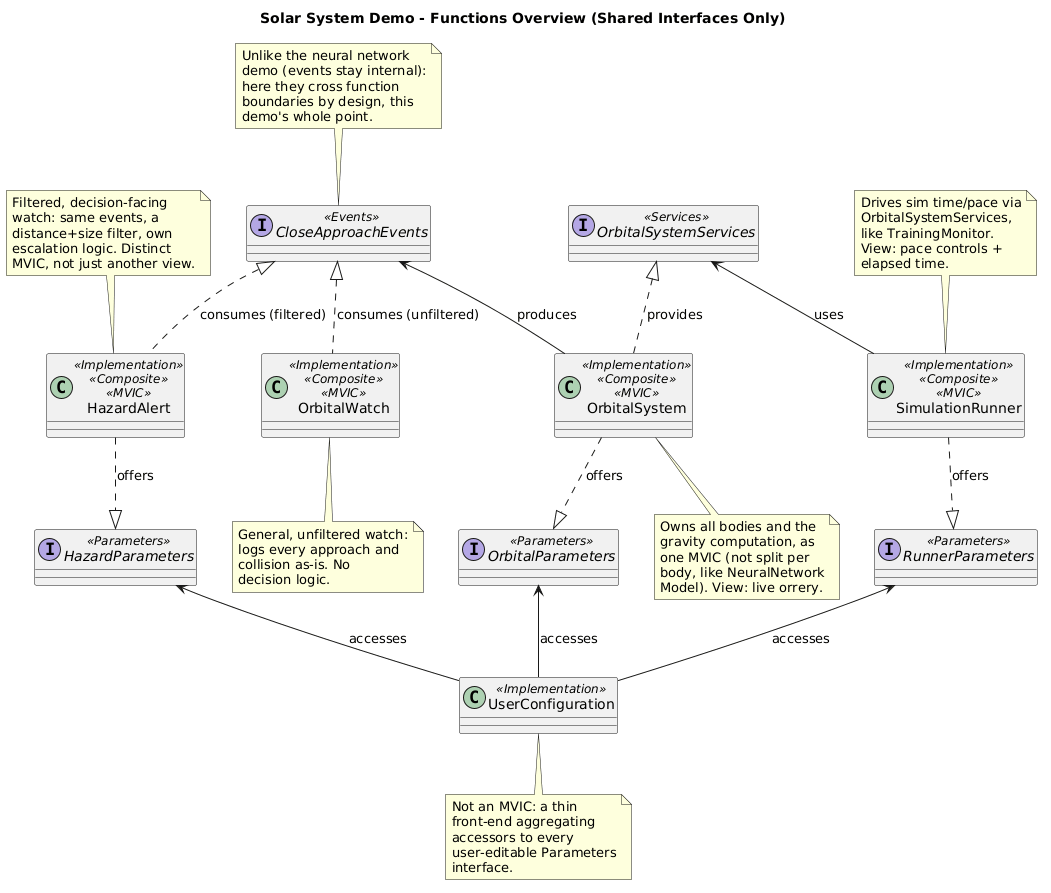
The interfaces that actually cross function boundaries, in one place. Four
of the six root composites are full
MVICs (Model / Controller /
Interaction Controller / View); UserConfiguration is deliberately not one - it
has no Model or Controller of its own, only an Interaction Controller that
accesses other functions’ Parameters interfaces directly, and a View.
The centerpiece is CloseApproachEvents, produced once by OrbitalSystem
and consumed by two different functions in two different ways - detailed
further down. Unlike the neural network demo, where events stay internal
to their own function, this demo uses events across function boundaries by
design; a Services interface (OrbitalSystemServices) still exists
alongside it wherever a function needs to reach into another and get
something back, rather than just be notified.
Per-Function Decomposition
Each function below is shown as its own MVIC, with full interface method signatures, plus the public interfaces it exposes to or consumes from the rest of the demo.
OrbitalSystem
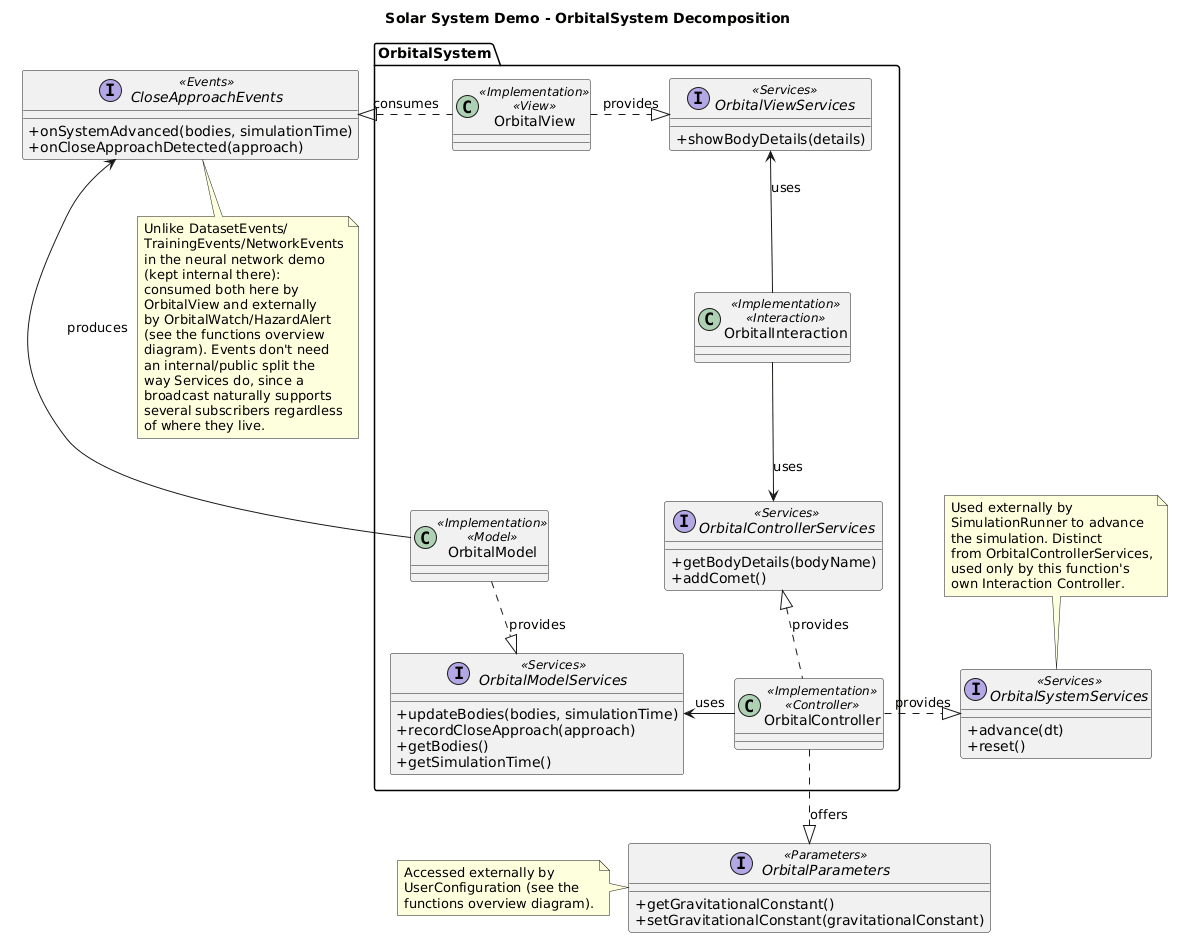
Owns every body and the gravity integration as a single MVIC - not one
component per body. It exposes three separate interfaces for three
separate audiences: OrbitalControllerServices for its own Interaction
Controller only, OrbitalSystemServices for SimulationRunner to advance
the simulation, and OrbitalParameters for UserConfiguration to tune the
gravitational constant. CloseApproachEvents is produced here and is the
one interface in the whole demo that does not need an internal/public
split: a broadcast naturally supports several subscribers, wherever they
live, without the provider needing to know who they are.
SimulationRunner
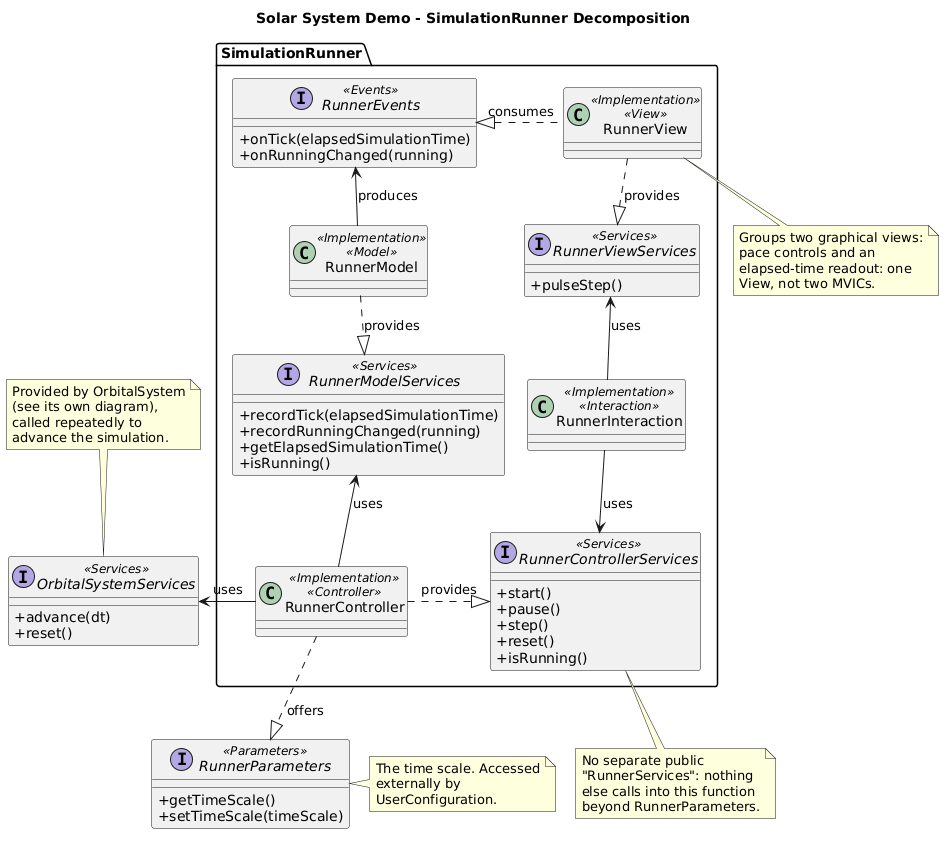
Drives the simulation’s time and pace by calling
OrbitalSystemServices.advance(dt) repeatedly, exposing start/pause/step/
reset through RunnerControllerServices and the current time scale through
RunnerParameters. Its View groups two graphical panels - pace controls
and an elapsed-time readout - as one View, not two: grouping is a View
concern, not a reason to split the MVIC.
OrbitalWatch
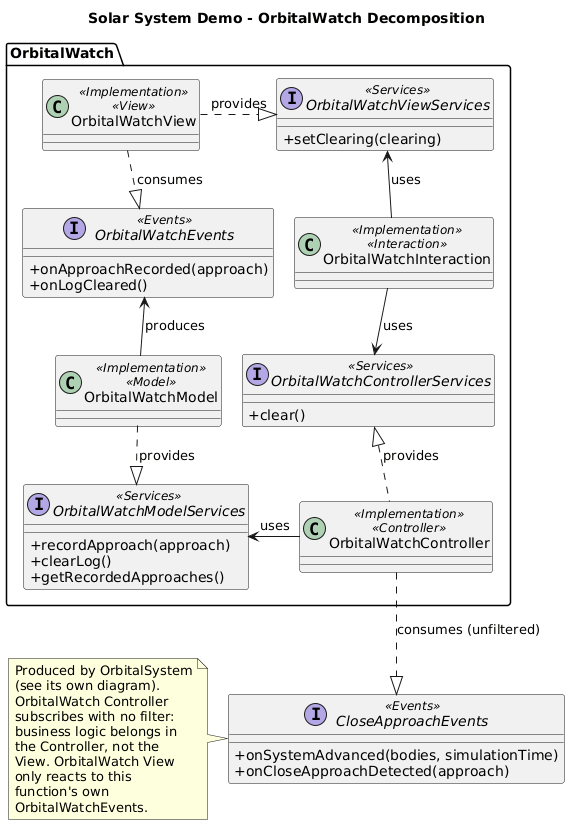
A general, unfiltered log of every close approach the simulation detects.
Its Controller subscribes to CloseApproachEvents with no filter at all -
logging everything as-is is exactly the point, and there is no distance or
size logic to speak of.
HazardAlert
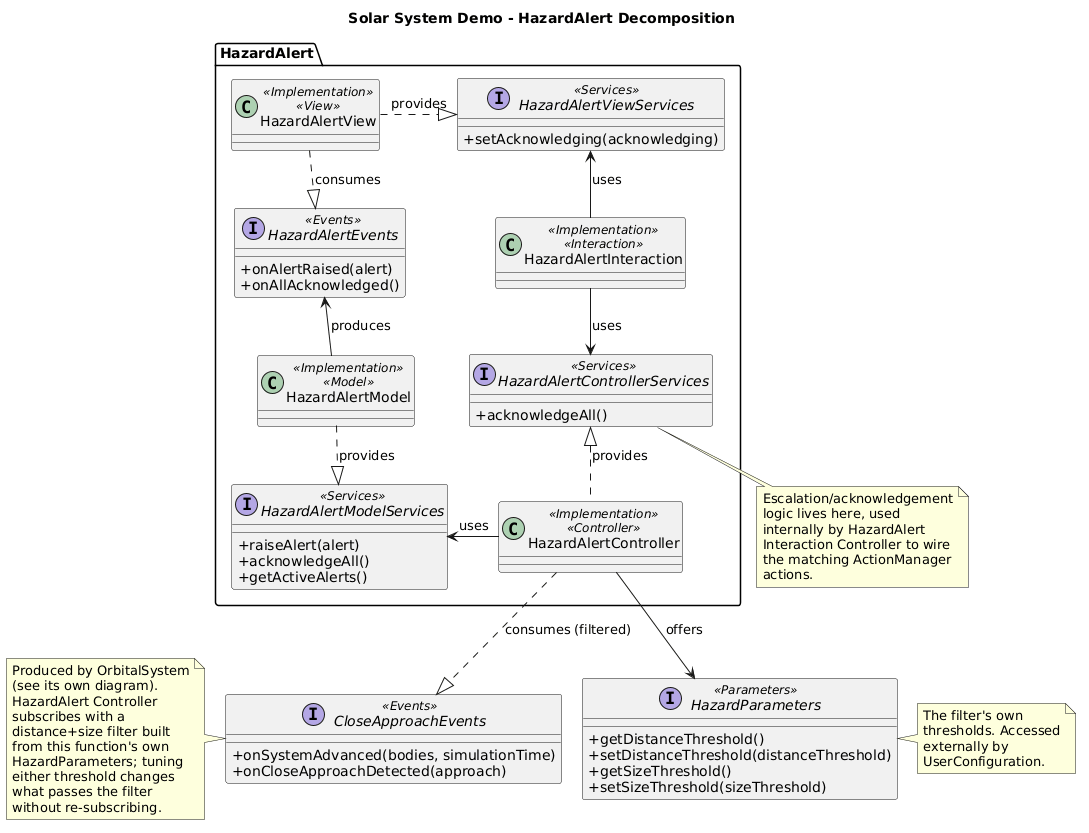
Watches the same CloseApproachEvents stream as OrbitalWatch, but
subscribes with an event filter
built from its own HazardParameters (distance and size thresholds). This
is the demo’s clearest illustration of what a filter is for: two
independent consumers seeing different subsets of one broadcast, with
neither one filtering events itself in its own callback, and the filter
re-reading the live threshold on every notification - moving a slider
changes what qualifies from the next close approach on, with no
re-subscription needed.
OrbitalWatch and HazardAlert both consume CloseApproachEvents, but not
the same way. OrbitalWatch just implements the interface - managed
autowiring subscribes it, unfiltered:
public class OrbitalWatchControllerImpl implements OrbitalWatchController,
        OrbitalWatchControllerServices, CloseApproachEvents {
    @Override
    public void onCloseApproachDetected(CloseApproach approach) {
        this.useOrbitalWatchModelServices.recordApproach(approach);
    }
}
HazardAlert subscribes itself manually, through the events interface’s
subscribe interface, passing a filter built from its own live HazardParameters:
@UsedEventsSubscribe
private CloseApproachEvents.CloseApproachEventsSubscribe useCloseApproachEventsSubscribe;

@Activation
public void subscribeFiltered() {
    this.useCloseApproachEventsSubscribe.subscribe(this, new HazardFilter());
}
HMI Assembly
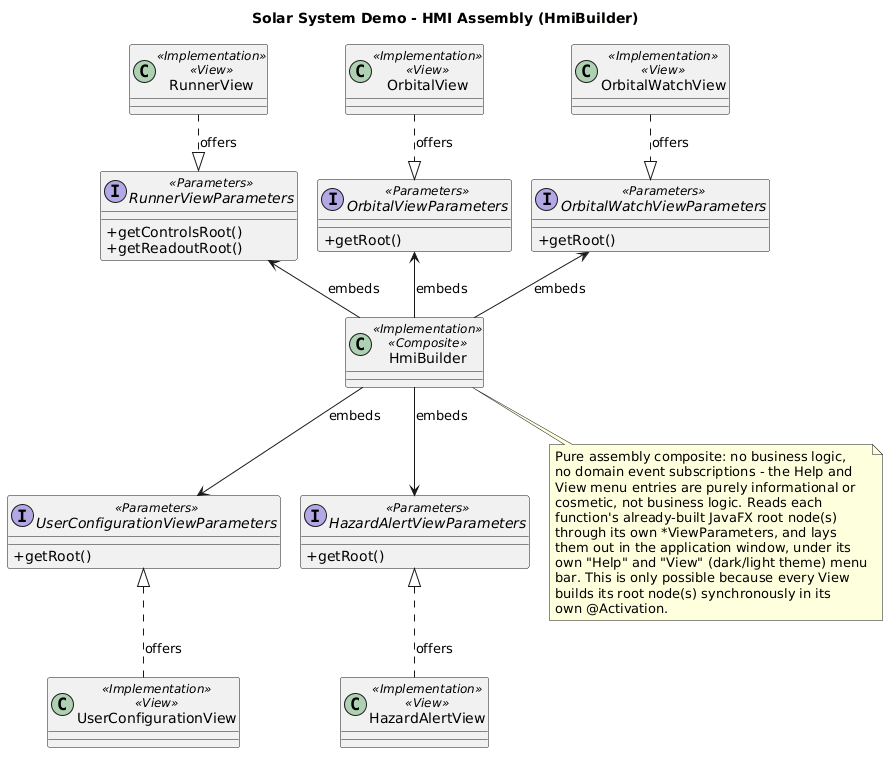
The one mechanism the per-function diagrams above cannot show on their
own: how the five Views end up laid out in a single window. Each View
exposes its own *ViewParameters interface - a getRoot() accessor to the
JavaFX node(s) it already built - and HmiBuilder is the sole consumer of
all five. HmiBuilder is a pure assembly composite: no business logic, no
domain event subscriptions, nothing but reading each function’s
already-built root node(s) and arranging them in the application window.
This only works because every View builds its root node(s) synchronously
in its own @Activation, so by the time HmiBuilder activates and reads
the parameters, every root node already exists.
HmiBuilder also wires two pieces of code of its own, beyond assembly: a
static “Help” menu, with an “About Solar System Simulation” entry
summarizing what the demo does and which Covalent mechanisms it
illustrates, and a “Using Solar System Simulation” entry describing its
controls - exactly as in the other three demos (see Neural Network
Trainer - Architecture);
and a “View” menu of two mutually exclusive RadioMenuItems, swapping the
whole scene’s stylesheet between a dark theme (the default) and a light
one - the one menu unique to this demo.
Home | Previous: Covalent Examples Guide | Next: Neural Network Trainer - Architecture